.png)
A "Register" in a super shop or supermarket usually refers to a checkout counter or station where customers complete their purchases and pay for their selected items. A registrar enters the customer's sales information into the software.
How does the register work?
A prerequisite for selling is to open a register.
To open a new Register expand the Sale menu from the left sidebar after that click on the POS menu.
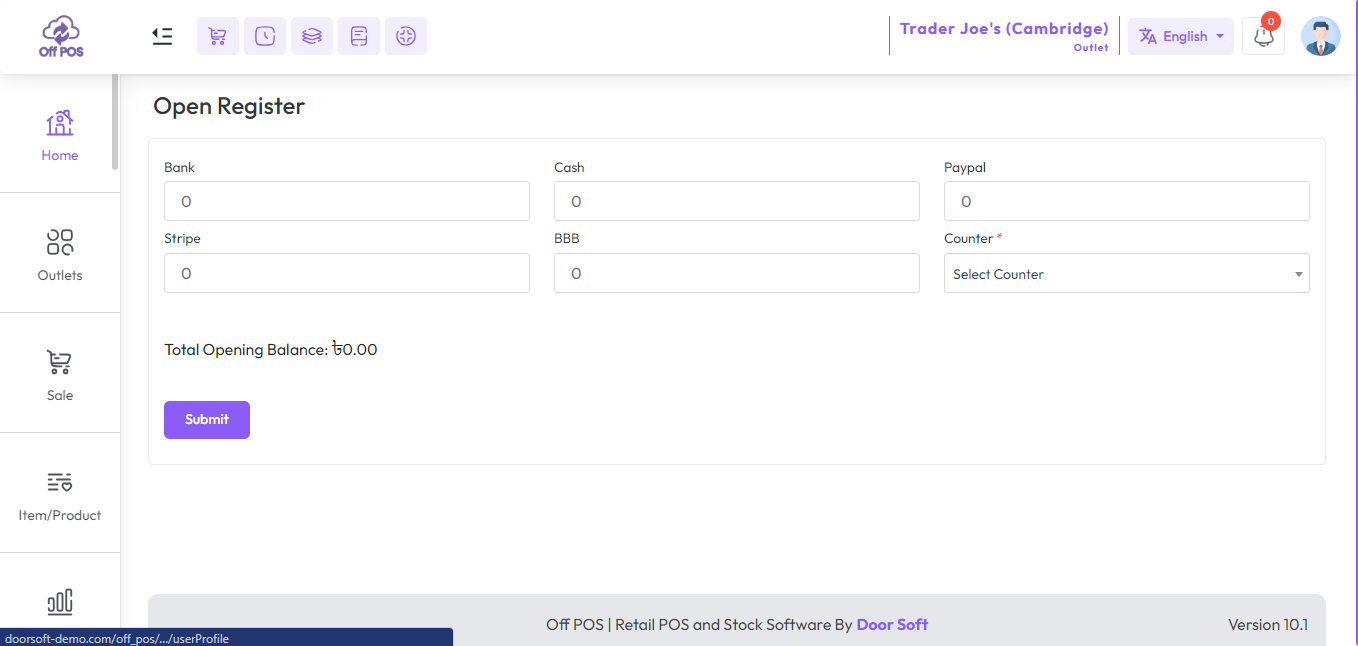
After clicking the Submit button, you will see an interface similar to the snapshot below.
Set the opening balance according to the payment method, and select a counter from the counter field. after that hit the submit button.
NB: If the register interface does not appear after clicking the "POS" menu, it means that the register is already open.
Click here to read about the "What is counter? how does work?" article.
Was this page helpful?
Thank you for your feedback!
Please Login First
In publishing and graphic design, Lorem ipsum is a placeholder text commonly used to demonstrate the visual form of a document or a typeface without relying on meaningful content. Lorem ipsum may be used as a placeholder before final copy is available.
Helpdesk - AI Powered Customer Support Portal and Knowledgebase System
Comments (00)